Bougainvillea Script: Elevating Digital Brand Identity
I was staring at a blank hero section on a new client’s site, trying to make a boutique skincare brand feel both luxurious and approachable. The layout was clean, the photography was high-end, but the typography felt cold. It needed personality without sacrificing readability. That is when I pulled up Bougainvillea Script from the Script Amp collection. In less than ten minutes, the entire vibe of the page shifted from generic to bespoke.
This isn’t just another decorative typeface; it is a modern script font that bridges the gap between handwritten elegance and digital clarity. For web designers and UI creators, finding a script that looks good on a 4K monitor but still holds up on a mobile screen is often a nightmare. Bougainvillea Script solves that problem by balancing fluidity with structure. Here is how I integrated it into a real-world landing page project and what you need to know before adding it to your design toolkit.
The Visual Personality of Bougainvillea Script
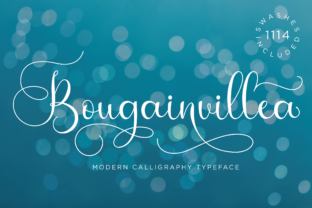
When you first open the font file, the first thing you notice is the weight distribution. Unlike many brush scripts that are heavy and aggressive, Bougainvillea has a lighter, airier touch. It feels like a confident signature rather than a shouted headline. The terminals (the ends of the strokes) are soft, which gives the letters a friendly, organic feel. This makes it perfect for brands that want to appear premium yet human.
The character set is surprisingly robust for a script. It includes standard Latin characters, but also nice ligatures and swashes that activate automatically in most modern browsers. When used correctly, these automatic alternates create a flowing rhythm that guides the eye across the screen. However, this requires restraint. As a designer, my instinct was to use it everywhere, but experience tells me that a premium font like this works best as an accent, not a body text replacement.
Real-World Application: The Hero Section Test
In my recent project for a wellness coach, I tested Bougainvillea Script in the main H1 tag. The challenge was placing it over a background image with moderate contrast. Script fonts can sometimes struggle with legibility against complex backgrounds because the varying stroke widths create visual noise.
To solve this, I used a subtle dark overlay on the image and kept the text color white. The result was striking. The font’s modern look cut through the visual clutter. Because the letterforms are distinct, users could scan the headline instantly. If I had chosen a more chaotic handwritten font, the message would have been lost. Bougainvillea strikes a balance: it is stylish enough to grab attention but structured enough to be read quickly. This directly impacts user engagement metrics, as visitors decide within seconds whether to stay or leave.
Why It Works for Landing Pages and Sales Funnels
For course creators and digital product sellers, trust is everything. A polished typographic hierarchy signals professionalism. Using Bougainvillea Script for section headers—like "What You’ll Learn" or "Testimonials"—adds a layer of editorial design quality to the page. It elevates the perceived value of the offer. Instead of looking like a template-based site, the page feels custom-designed. This subtle cue can influence conversion rates by making the brand feel more established and credible.
Readability and Mobile Responsiveness
We cannot ignore mobile traffic. Over 60% of web visits happen on smartphones. When I scaled down the Bougainvillea Script for smaller viewports, I found that sizes below 24px started to lose their charm. The thin lines became too faint, and the details got muddy. Therefore, my advice is to reserve this font for headlines and large display text. Keep it above 28px on desktop and 24px on mobile for optimal clarity.
Another critical factor is line height. Script fonts often have ascenders and descenders that extend far beyond the baseline. If you set tight line spacing, the tails of the letters will collide with the line below, creating a messy appearance. Always increase the line-height property in your CSS when using this font. A ratio of 1.4 to 1.6 usually provides enough breathing room for the eye to track the text comfortably.
Strategic Font Pairing for Web Design
No single typeface can do everything. To build a cohesive brand identity, you need to pair Bougainvillea Script with a neutral, highly readable font. Since Bougainvillea is a modern typography piece with artistic flair, it pairs beautifully with clean sans serif fonts.
- For a Clean, Minimalist Look: Pair it with a geometric sans serif like Montserrat or Lato. This combination works exceptionally well for tech startups, SaaS founders, and modern portfolios. The contrast between the organic script and the rigid geometry creates visual interest.
- For an Editorial, High-End Feel: Try pairing it with a classic serif font like Playfair Display or Merriweather. This setup is ideal for fashion blogs, luxury e-commerce stores, and wedding invitation sites. The serif adds authority and tradition, while the script adds a personal touch.
Avoid pairing it with other decorative fonts. The goal is to let Bougainvillea shine as the star. Use your secondary font for paragraphs, navigation menus, and button labels. This establishes a clear visual hierarchy, helping users distinguish between important headings and supporting content.
Best Practices for Buttons and Calls-to-Action
I recommend avoiding Bougainvillea Script for buttons or small interactive elements. Scripts are difficult to read at small sizes, and they can make tap targets feel imprecise on touch screens. Instead, use a bold, simple sans serif for your call-to-action (CTA) buttons. You can use the script for the label above the button or as a decorative element near the CTA, but keep the clickable text clean and functional. This respects the user’s need for efficiency and accessibility.
Technical Considerations for Developers
Before implementing Bougainvillea Script in a live environment, there are a few technical checks to perform. First, verify the file formats. Ensure you have WOFF2 files available, as they offer the best compression and loading speed for modern browsers. Slow-loading fonts can hurt your Core Web Vitals scores, so optimizing these assets is crucial for SEO.
Next, check the licensing. As a commercial font, Bougainvillea Script requires appropriate licensing for web usage. Make sure you have the correct license tier for the number of monthly page views or projects you intend to use it in. Ignoring this step can lead to legal issues later.
Finally, test the multilingual support if your audience is global. While Bougainvillea covers standard Latin characters well, it may not include accented characters for languages like French, Spanish, or German unless specified. If your site serves an international audience, confirm that the necessary diacritics are included in the package to maintain consistency across all languages.
Building Trust Through Consistent Typography
Typography is often overlooked in favor of images and colors, but it forms the backbone of your digital brand kit. Consistency in font usage builds subconscious trust. When every page uses Bougainvillea Script in the same way—for headlines, quotes, and key highlights—the brand feels unified. This repetition reinforces brand recognition.
Whether you are designing a portfolio homepage, a product landing page, or a blog redesign, taking the time to select the right typeface pays off. Bougainvillea Script offers a stylish script option that doesn’t compromise on modern usability. It allows you to inject personality into your layouts while maintaining the professional polish that today’s users expect. By testing it in your hero sections, pairing it wisely, and respecting its limitations on mobile, you can create a website that not only looks beautiful but performs effectively.
In the end, good design is about solving problems elegantly. Bougainvillea Script solved the problem of "how do we make this brand feel special?" without breaking the rules of digital readability. It is a versatile tool in any designer’s arsenal, ready to add that amazing personal touch to your next online project.